
Fuel prices, regular wear and tear, and unexpected repairs can quickly increase fleet operating costs. For businesses that rely on vehicles, managing these expenses is essential to maintaining profitability.
Fleet management software helps businesses track vehicle performance, monitor fuel consumption, optimise routes, and schedule maintenance. The U.S. Department of Energy also highlights these practices as important for improving fleet efficiency.
However, software alone won’t reduce costs. The real savings come from using its features to identify inefficiencies and make better decisions. Let’s explore eight key features that can help reduce fuel and maintenance expenses.
What Is Fleet Management Software?
Fleet management software is a digital system that helps businesses monitor and manage their vehicles, drivers, maintenance activities, fuel usage, and daily operations. Depending on the platform and the connected hardware, it may provide GPS tracking, vehicle diagnostics, maintenance reminders, driver behaviour reports, fuel records, and route planning tools.
For example, imagine a delivery business operating 30 vehicles across a city. Without a centralised system, its manager might struggle to identify which vehicle consumes the most fuel, which driver spends the longest time idling, or which van repeatedly requires repairs.
Fleet management software can bring these details together, making it easier to spot patterns and decide what needs attention.
Its main purpose is not simply to track vehicles on a map. It is to help businesses make informed decisions about how their vehicles are used, maintained, and operated.
8 Fleet Management Software Features That Help Reduce Costs
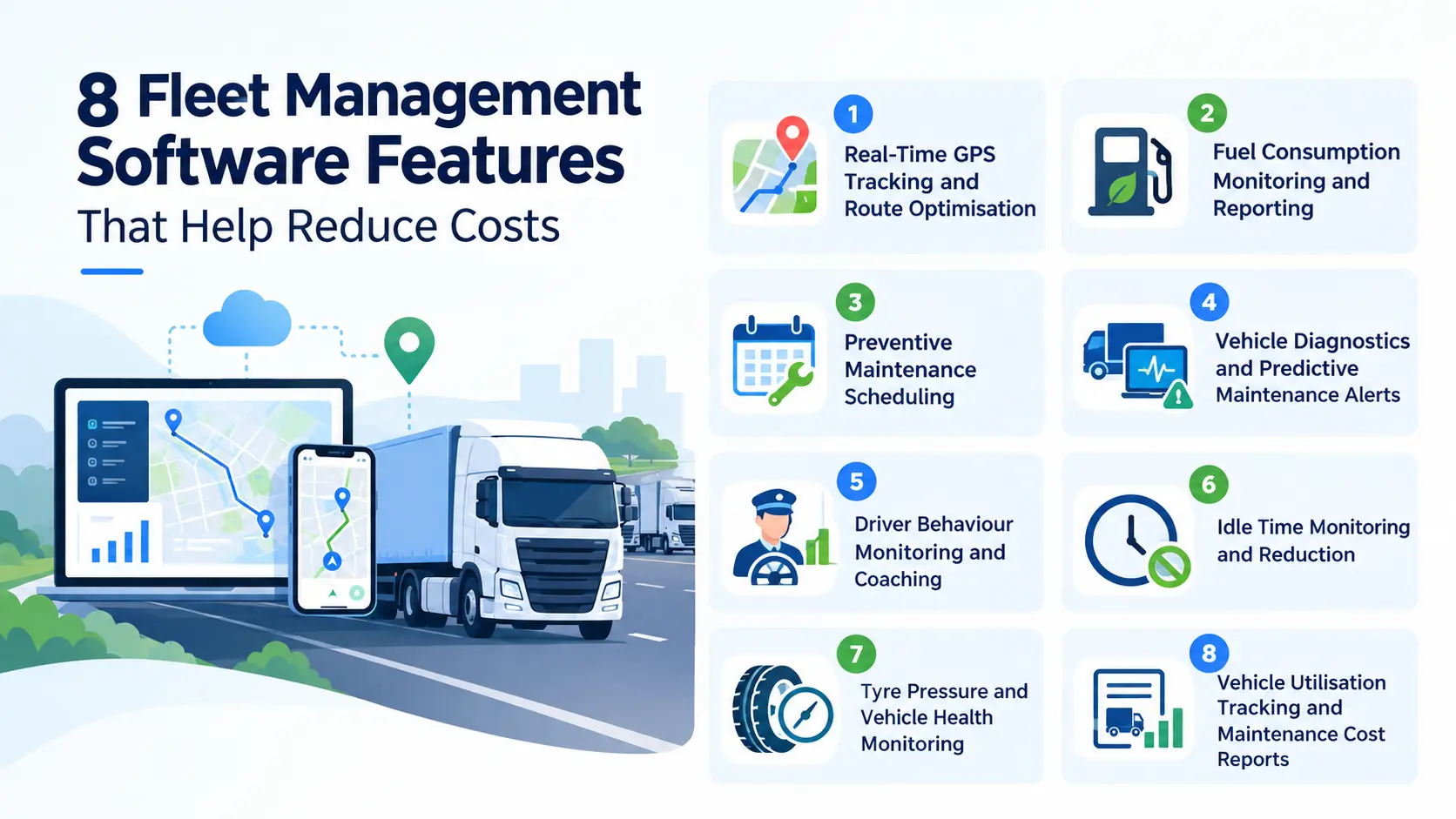
1. Real-Time GPS Tracking and Route Optimisation
A vehicle taking a longer route than necessary may not seem like a serious problem at first. However, when the same thing happens across multiple vehicles every day, the additional distance can mean more fuel consumption, longer working hours, and unnecessary wear on vehicle components.
GPS tracking and route optimisation help fleet managers understand where vehicles are travelling and whether those journeys can be made more efficient.
GPS tracking records vehicle locations and trip histories. Route optimisation tools can then help managers plan journeys based on delivery locations, travel requirements, and other operational constraints. Some systems also support route monitoring and alerts when vehicles move outside assigned routes.
Platforms such as FleetPulse combine live vehicle and route tracking with historical breadcrumb trails. Managers can review where a vehicle has been, spot repeated detours, and audit stops and route deviations after the day’s trips.
How this feature helps reduce costs:
- Reduces Unnecessary Mileage: Managers can identify repeated detours and journeys that cover more distance than required.
- Improves Route Planning: Delivery schedules can be arranged to reduce avoidable travel between stops.
- Helps Control Operating Hours: Better-planned journeys can reduce wasted time on the road.
- Improves Vehicle Utilisation: Managers can review trip histories and allocate vehicles more effectively.
For example, a delivery company serving several neighbourhoods can group nearby deliveries into a more practical route rather than sending its vehicles back and forth across the city.
One important point: the shortest route is not always the cheapest. Traffic congestion, road conditions, tolls, vehicle restrictions, and delivery deadlines can all affect the best route. Fleet managers should consider these factors instead of focusing on distance alone.
2. Fuel Consumption Monitoring and Reporting
Fuel expenses are not always easy to control because they depend on several factors, including fuel prices, vehicle condition, driving behaviour, traffic, and the type of work being performed.
Fuel monitoring features help businesses move beyond simply recording how much they spend at the pump. Depending on the available integrations, fleet management software can track fuel transactions, mileage, fuel consumption, and fuel economy over time.
The U.S. Department of Energy identifies fuel consumption, fuel transactions, vehicle mileage, and vehicle usage as useful data points for evaluating fleet performance.
How this feature helps reduce costs:
- Identifies Inefficient Vehicles: Compare fuel economy across vehicles with similar workloads and operating conditions.
- Highlights Unusual Fuel Usage: Investigate sudden changes in consumption or discrepancies between fuel purchases and recorded mileage.
- Improves Fuel Budgeting: Historical reports help businesses estimate fuel requirements more accurately.
- Supports Better Purchasing Decisions: Fuel data can help managers evaluate whether a vehicle remains economical for its assigned work.
For instance, if two similar vans cover comparable distances but one consistently uses more fuel, the difference deserves investigation. It could be related to tyre pressure, maintenance issues, traffic conditions, excessive idling, or driving habits.
The software helps identify the pattern, but it cannot automatically prove the cause. Managers still need to review the vehicle’s condition, usage, and fuel records before deciding what to do.
3. Preventive Maintenance Scheduling
A vehicle does not have to break down completely to start costing a business more money. Worn components, overdue servicing, neglected filters, and unresolved mechanical issues can affect performance long before a vehicle stops working.
Preventive maintenance scheduling helps businesses organise servicing before problems become more disruptive.
Fleet management software can generate maintenance reminders based on mileage, engine hours, dates, or manufacturer-recommended service intervals. Depending on the system, managers may also be able to store service records, monitor upcoming work, and track maintenance expenses. The U.S. Department of Energy specifically identifies scheduled maintenance alerts as a useful telematics feature.
How this feature helps reduce costs:
- Prevents Missed Servicing: Automated reminders make it easier to schedule oil changes, inspections, and other routine work.
- Reduces Avoidable Breakdowns: Regular inspections can reveal developing problems before they cause a vehicle to become unusable.
- Supports Consistent Vehicle Performance: Maintaining engines, tyres, filters, and other components can help vehicles operate efficiently.
- Makes Maintenance Easier to Plan: Managers can schedule workshop visits around vehicle availability and business requirements.
Consider a transport company that relies on every vehicle to complete its daily assignments. If a van breaks down unexpectedly, the business may have to arrange another vehicle, reschedule deliveries, and pay for emergency repairs.
Preventive maintenance cannot eliminate every breakdown. However, a properly managed maintenance schedule helps reduce the risk of avoidable failures and makes servicing more predictable.
4. Vehicle Diagnostics and Predictive Maintenance Alerts
Preventive maintenance follows an established service schedule. Predictive maintenance goes a step further by using available vehicle data to identify warning signs that may require attention before a failure occurs.
This distinction matters because vehicles do not always develop problems according to a fixed timetable.
Vehicle diagnostics and predictive maintenance features can use data from onboard diagnostic systems and connected sensors to identify fault codes or changes in vehicle condition. Depending on the vehicle and hardware, this information may include engine temperature, battery voltage, oil-life indicators, and tyre pressure.
How this feature helps reduce costs:
- Flags Potential Problems Earlier: Diagnostic alerts can prompt an inspection before a minor issue becomes a more serious repair.
- Helps Prioritise Repairs: Managers can review fault alerts and determine which vehicles need immediate attention.
- Reduces Unplanned Downtime: Early intervention may help prevent certain mechanical failures from disrupting operations.
- Supports Repair Decisions: Diagnostic information gives technicians a starting point for investigating the cause of a problem.
For example, a connected vehicle might report an engine-related fault or an abnormal coolant temperature. A fleet manager can arrange an inspection instead of waiting for the driver to report a more serious problem.
There is a limitation worth understanding: an alert is not the same as a confirmed diagnosis. Not every vehicle supports the same data, and not every fault can be predicted. Qualified technicians must still inspect the vehicle and determine the appropriate repair.
5. Driver Behaviour Monitoring and Coaching
Two drivers can operate similar vehicles on comparable routes and still achieve different fuel economy. Their acceleration, braking, speed, gear changes, and driving consistency can influence how efficiently the vehicles operate.
Fleet management software with telematics can record behaviours such as speeding, harsh braking, rapid acceleration, and excessive idling. Managers can use these reports to identify patterns and offer targeted coaching rather than relying entirely on assumptions.
How this feature helps reduce costs:
- Encourages Smoother Driving: Gradual acceleration and braking can reduce unnecessary fuel consumption and component wear.
- Helps Reduce Excessive Speeding: Driving at appropriate speeds supports safer operations and better fuel efficiency.
- Identifies Training Needs: Driver reports can show where additional guidance may be useful.
- Supports Safer Vehicle Use: Behaviour monitoring can help managers address recurring driving risks.
The U.S. Department of Energy’s Alternative Fuels Data Center recommends driver training that addresses idling, speeding, aggressive acceleration, frequent braking, and inefficient routes. It also explains how telematics feedback can help drivers improve their habits.
For businesses, the best approach is to use this information constructively. A driver who regularly brakes harshly may need more training, but the pattern could also reflect congested roads, difficult routes, or frequent stops. Context matters.
A useful system should help managers understand what is happening and support improvement, rather than simply rank drivers by a score.
6. Idle Time Monitoring and Reduction
A vehicle can consume fuel even when it is not moving. This often happens when drivers leave engines running during loading, unloading, waiting periods, or extended stops.
Individually, these periods might seem insignificant. Across a fleet operating every day, however, unnecessary idling can become a recurring expense.
Fleet management software can monitor idle time, identify repeated idle events, and help managers understand where the problem occurs. Telematics systems can also provide alerts and reports to support idle-reduction policies.
How this feature helps reduce costs:
- Makes Wasted Fuel More Visible: Managers can identify vehicles that spend unusually long periods idling.
- Helps Improve Scheduling: Repeated waiting periods may indicate avoidable delays at depots or customer locations.
- Reduces Unnecessary Engine Operation: Practical idle-reduction policies can limit fuel consumption and engine wear.
- Supports Driver Awareness: Reports help drivers recognise when engines are running unnecessarily.
The U.S. Environmental Protection Agency explains that reducing prolonged truck and bus idling can lower fuel and engine maintenance costs while helping extend engine life.
For example, a delivery company may discover that several vehicles idle for long periods while waiting for loading bays. Adjusting loading schedules or improving coordination could help reduce the problem without requiring new vehicles.
However, not every instance of idling is unnecessary. Safety requirements, traffic conditions, temperature, and equipment needs must be considered before introducing an idle-reduction policy.
7. Tyre Pressure and Vehicle Health Monitoring
Tyres are easy to overlook during routine fleet operations, yet their condition affects fuel efficiency, handling, safety, and replacement costs.
Underinflated tyres increase rolling resistance, meaning the engine must work harder to move the vehicle. Poor tyre condition can also increase the risk of uneven wear and premature replacement.
Fleet management software may support tyre pressure monitoring through connected sensors or integrations, although this feature is not available in every system or vehicle.
The U.S. Department of Energy recommends maintaining tyres at the manufacturer’s recommended pressure. Its Alternative Fuels Data Center states that properly inflated tyres can improve fuel economy by an average of 0.6%, with improvements of up to 3% in some circumstances.
How this feature helps reduce costs:
- Flags Pressure Problems: Connected monitoring can alert managers or drivers when supported sensors detect abnormal tyre pressure.
- Supports Timely Inspections: Maintenance teams can check tyres before pressure issues lead to further problems.
- Helps Extend Tyre Life: Appropriate inflation and regular inspections support more even tyre wear.
- Improves Operational Safety: Tyre checks can help identify conditions that affect handling and roadworthiness.
Imagine a fleet of delivery vans making frequent stops throughout the day. If tyre pressure is not checked consistently, a small maintenance oversight can affect both fuel efficiency and tyre wear.
A connected monitoring system can make these issues easier to identify. Where live tyre data is unavailable, scheduled manual inspections and pressure checks remain important.
8. Vehicle Utilisation Tracking and Maintenance Cost Reports
Sometimes the problem is not how much fuel a vehicle consumes on a particular trip. It is whether the business needs that vehicle for the amount of work it actually performs.
A company may have several vehicles assigned to different teams, even though some remain unused for long periods while others handle most of the workload. Keeping underused vehicles in the fleet can still involve insurance, servicing, registration, financing, and depreciation expenses, depending on the ownership arrangement.
Vehicle utilisation tracking helps businesses understand how frequently each vehicle is used, how far it travels, and how much work it performs. Maintenance cost reports add another layer by showing how much individual vehicles cost to keep operational.
The Department of Energy recommends analysing vehicle usage, mileage, engine hours, and cost information to support fleet planning and identify underutilised vehicles.
How this feature helps reduce costs:
- Identifies Underused Vehicles: Managers can assess whether vehicles could be reassigned or shared.
- Highlights Expensive Assets:Maintenance reports can reveal vehicles that repeatedly require costly repairs.
- Improves Replacement Planning: Historical usage and cost data help inform decisions about repairing or replacing vehicles.
- Supports Better Fleet Sizing: Businesses can evaluate whether their fleet matches actual operational requirements.
For example, a company might find that one van is rarely used while another covers several routes each day. Reallocating work or introducing a shared-vehicle schedule may improve utilisation without immediately purchasing another vehicle.
The goal is not to reduce fleet size at any cost. A vehicle that appears underused may still be essential for emergency work, seasonal demand, or backup operations. Decisions should reflect business requirements as well as cost reports.
How to Use Fleet Management Software to Get Better Results?
Having access to vehicle data is useful, but the real savings come from turning that information into everyday decisions. Businesses should start with the problems that affect their operations most rather than trying to use every feature immediately. Here is a practical way to get started:
Step 1: Establish Your Current Operating Costs
Before making changes, record your existing fuel and maintenance expenses. This gives you a baseline against which you can measure improvements.
Start by tracking:
- Fuel spending and consumption for each vehicle.
- Distance travelled and engine hours, where available.
- Maintenance, repair, and tyre replacement expenses.
- Vehicle downtime and missed service appointments.
- Idling time and driving behaviour, if telematics data is available.
Accurate vehicle-level data helps managers understand where costs are coming from and which areas need attention.
Step 2: Identify the Biggest Sources of Waste
Once you have collected the data, look for recurring patterns. For example, you might find that certain vehicles consistently consume more fuel, some drivers spend excessive time idling, or a particular vehicle requires frequent repairs.
Do not assume that every unusual figure points to poor performance. A vehicle carrying heavier loads or working in congested areas may naturally consume more fuel than one travelling on open roads. The purpose of the analysis is to identify issues that can be addressed, not simply to label vehicles or drivers as inefficient.
Step 3: Set Measurable Improvement Goals
Choose a few realistic targets based on your existing data. These might include reducing unnecessary idling, improving maintenance compliance, lowering fuel consumption per kilometre, or reducing unplanned vehicle downtime. Make sure each target has a clear measurement method and a reasonable timeframe.
For example, a fleet manager could compare average fuel consumption per 100 kilometres before and after introducing route changes. This helps show whether the changes made a measurable difference.
Step 4: Review Results Regularly
Use weekly or monthly reports to check whether the changes are working. If fuel consumption has improved but maintenance costs remain high, investigate the maintenance records separately.
Fuel and maintenance savings should be assessed alongside the software subscription, installation, hardware, and implementation costs. This gives you a more realistic picture of the overall financial benefit.
What Should You Look for When Choosing Fleet Management Software?
Not every fleet needs an advanced telematics system. A small delivery business may prioritise service reminders and mileage tracking, while a larger transport operation may require GPS tracking, vehicle diagnostics, and detailed reporting.
Before choosing a platform, consider the following:
Vehicle Compatibility: Check whether the software supports your vehicle types, models, and available diagnostic systems.
Fuel Monitoring: Confirm whether it tracks fuel transactions, consumption, mileage, or fuel economy, and whether additional integrations are required.
Maintenance Management: Look for configurable service reminders, maintenance histories, fault alerts, and repair cost records.
Reporting and Analytics: Ensure that reports can help you compare vehicles, identify recurring issues, and measure performance.
Integration Options: Check whether the software works with your existing fuel cards, accounting tools, GPS devices, or maintenance systems.
Ease of Use: Choose a platform that managers and drivers can use without creating unnecessary administrative work.
Data Security and Privacy: Understand how vehicle location, driver information, and operational records are stored and accessed.
Also, ask which features require additional hardware or paid add-ons. A platform may advertise vehicle diagnostics, for example, but the data available can depend on the vehicle, sensors, and installed telematics equipment. The U.S. Department of Energy highlights vehicle compatibility, data integration, cybersecurity, and privacy as important considerations when implementing telematics.
Conclusion
Reducing fleet expenses is not always about spending less on fuel or delaying vehicle repairs. Often, it starts with understanding why costs are increasing in the first place.
Fleet management software gives businesses a more organised way to monitor vehicle performance, plan maintenance, improve routes, and identify waste. Its value comes from making problems visible early enough for managers to take practical action.
Start with the features that address your biggest expenses. Track the results, review what works, and refine your approach as your fleet’s needs change. Over time, these small operational improvements can help businesses control running costs, reduce avoidable downtime, and make better use of the vehicles they already own.
Fleet tracking is one part of a wider digital toolkit. You can explore our other software products built for logistics, delivery, and business operations.
Your questions, our answers
It helps businesses monitor fuel consumption, optimise routes, identify unnecessary idling, and understand driving behaviour. These insights allow managers to address inefficient practices and measure whether changes improve fuel economy.
Yes, it can help by automating service reminders, recording repair histories, and flagging available diagnostic information. These features support timely inspections and repairs, although they cannot prevent every mechanical failure.
Preventive maintenance follows a planned schedule based on factors such as mileage, time, or engine hours. Predictive maintenance uses available vehicle data and condition indicators to identify potential problems that may require attention before a failure occurs.
GPS tracking provides location and trip information that can help managers review routes, identify unnecessary mileage, and improve vehicle allocation. Fuel savings depend on whether the business can make effective changes based on that information.
Yes. Small businesses can benefit from basic features such as mileage tracking, maintenance reminders, and fuel expense reports. The right choice depends on fleet size, operating requirements, budget, and the level of automation needed.
Businesses can compare fuel consumption, cost per kilometre, idle time, and distance travelled before and after implementation. Comparisons should account for factors such as workload, route conditions, vehicle type, and changes in fuel prices.
Some platforms offer basic fleet records, mileage tracking, and maintenance scheduling without dedicated GPS hardware. However, live vehicle tracking and certain telematics features generally require compatible devices, vehicle integrations, or built-in connectivity.
There is no universal timeframe. Results depend on the fleet's existing inefficiencies, the features implemented, the quality of collected data, and how consistently managers act on the findings. Establishing a baseline and reviewing performance over time helps businesses assess the results.